Learn more about Agent Led Growth: Gauge for coding agents >

Most platforms hand you a dashboard and leave the thinking to you. The Action Center finds the highest-value actions for your brand, shows the data behind each one, lets Gauge's agent do the work, then measures what it did to your citation rate and visibility. Triage, Tasks, Evaluation — the whole loop in one place.

Start for free
The Work Finds You — screenshot 1 of 1
MotherDuck logoCustomer logoBraintrust logoCustomer logoCustomer logoSupabase logoAVA logoCustomer logoHowdy logoResend logoMintlify logo

Triage a Ranked Queue

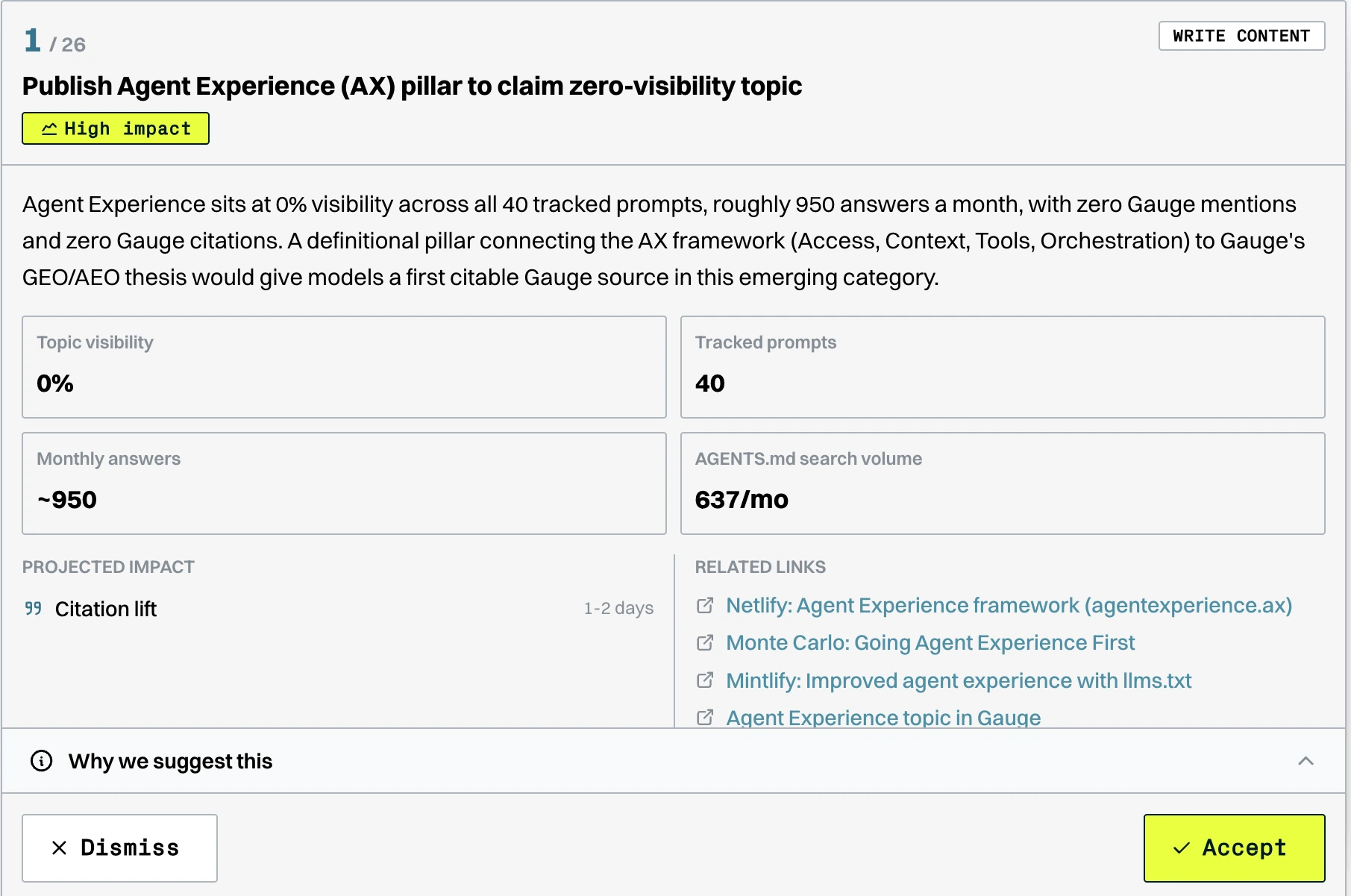
Gauge scores every opportunity across your prompt set and deals them to you one card at a time, tagged by impact and action type. Accept the ones worth doing, dismiss the rest. No backlog grooming, no staring at a dashboard wondering where to start.

Every Action Shows Its Evidence

Each card carries the numbers behind it: topic visibility, tracked prompts, monthly answers, keyword search volume, and the competitor sources already winning the space. A "Why we suggest this" panel spells out the reasoning so you can check it before committing an hour.

Accepted Actions Become Tasks the Agent Runs

Accepting an action moves it to Tasks, where you plan and complete the work — or hand it to Gauge. A Write Content action goes through the content engine from brief to draft to published, so you review rather than start from a blank page.

An Evaluation Tab for Completed Work

Every finished action lands in Evaluation, where Gauge reports what it actually did to your citation rate and visibility. Projected impact on the card, measured impact after the fact — that comparison is the part most platforms never show you.

How It Works

01

Gauge generates the actions

Your prompts run daily across every engine, and Gauge turns the gaps into dated batches of suggested actions — zero-visibility topics, pages cited without your brand named, weak health scores, influential sources missing you. You can also hit Generate Now, or add your own with New Action.

02

You triage the suggestions

Work the Triage queue card by card. Each one shows the supporting metrics, the projected impact and how long it should take, related competitor sources, and the reasoning behind the suggestion. Accept or dismiss — dismissed actions stay archived, not deleted.

03

The agent does the work

Accepted actions become Tasks. Assign them to teammates or let Gauge execute: brief, research, outline, draft, and review passes, then publish to Webflow, Framer, or Sanity — or open a pull request if your blog lives in a repo.

04

Gauge evaluates the result

Completed work moves to Evaluation. Because the same prompts keep running, the effect on citation rate and visibility shows up in the data, and Gauge reports the impact of each action against what it projected. That feedback is what makes this a loop rather than a to-do list.

Stop Prompting and Start Measuring

Get the complete toolkit you need to fully own, understand, and improve your brand's presence in AI.
Start for free
Call to action graphic

FAQs

Find answers to common questions about our app and services.

The Action Center is where Gauge turns AI visibility data into work that actually gets done. It's organized into three tabs that follow the work end to end: Triage, where you review suggested actions; Tasks, where you plan and complete them or hand them to the agent; and Evaluation, where Gauge reports the performance of completed work against your citation rate and visibility.

Triage is the inbox: suggested actions arrive as cards you accept or dismiss one at a time, each with the data behind it. Tasks is the workspace for everything you accepted, where you plan and complete the work or assign it to Gauge's agent. Evaluation is the scoreboard, showing how completed actions actually performed. Together they're the data-to-action-to-measurement loop as an interface.

Gauge scores opportunities across your entire tracked prompt set, weighting the gap between where you appear and where the demand is, then labels the strongest ones as high impact. The highest-priority actions are typically topics sitting at zero visibility across a large tracked prompt set with real search volume behind them, because a single well-structured page there can lift visibility across many related prompts at once.

Enough to judge it without leaving the card. You get the action type (such as Write Content), an impact label, a plain-language explanation of the gap, and supporting metrics like topic visibility, number of tracked prompts, monthly answers, and keyword search volume. Below that sits the projected impact with a rough time estimate, related links to the competitor sources already winning the space, and an expandable "Why we suggest this" panel.

It leaves your Triage queue and moves to a dismissed archive with a running count, so nothing is silently lost and you can revisit what you passed on. Dismissing is meant to be low-friction — the queue works best when you move through it quickly and only accept the work you actually intend to do.

Yes to both. New Action lets you add your own work to the board so the Action Center can serve as your single AEO backlog rather than a parallel list. Gauge also generates fresh batches on a schedule and shows the date of the next one, and Generate Now triggers a new batch immediately if you'd rather not wait.

Four main categories. Low mention rate fixes, where AI cites your page but doesn't name your brand in the answer, usually the fastest win. Content gaps, where competitors are cited on prompts you're absent from and new content is needed. Structural improvements, for pages scoring poorly on Gauge's 9-criteria health score. And influential citation opportunities, where a high-authority source that AI pulls from frequently doesn't mention you.

Both. Every action can be handed to Gauge's agent to carry out. For content actions that means the full pipeline: brief, research, outline, draft, and review passes, then publishing to your CMS. You stay in control at the brief and the outline, which are the two checkpoints where direction matters most, and nothing goes live on your production site unless you explicitly ask.

Because every prompt keeps running daily across every engine, the effect of a change shows up in the same metrics you were already tracking. Completed work moves to the Evaluation tab, and once an action has had time to take effect Gauge runs an impact analysis and sends you the result. Since each card carried a projected impact when you accepted it, you can compare what was expected against what actually happened. If Gauge detects a newly cited page matching an open content action, it marks the action complete automatically and tells you why.

Primarily citation rate and brand visibility, since those are the two numbers that drive AI presence. Citation rate is the percentage of answers pulling a URL from your domain as a source. Visibility is the percentage of answers naming your brand. Citations drive mentions, so most actions are designed to lift citation rate first and visibility as a result. Health score and URL mention rate are also tracked where an action targets them.

Monitoring tools stop at telling you something is wrong, and generic recommendations are easy to produce and hard to trust. The Action Center is built around a closed loop: the recommendation is backed by the specific data behind it, the agent can execute it for you, and the outcome is measured against your real metrics. Data, action, and measurement in the same product is what makes it a playbook rather than a dashboard.

They're two ways into the same work. The Action Center pushes: it assembles a ranked queue so the work reaches you without being asked for. Ask Gauge pulls: you ask questions in plain language and it analyzes, concludes, and executes. Most teams use both, asking the agent "what should I work on this week?" and triaging the queue Gauge has already built.

Gauge generates new batches on a schedule and displays the date of the next one, so you always know when to expect fresh work. You can trigger a batch yourself with Generate Now. New recommendations also reach you the same day through in-app notifications and Slack if it's connected, and they roll up into a weekly digest so the whole team stays aligned.

Yes. Accepted actions become Tasks that can be assigned to teammates, given due dates, and moved through statuses, so the Action Center works as your AEO backlog rather than a separate list to reconcile. Everyone in your workspace sees the same actions and the same underlying data.

Customers using content briefs generated from Action Center data have reported 10%+ month-over-month visibility gains. Standard Metrics went from appearing in 9% of AI answers to 24% in under two weeks using content gap recommendations, and Eco grew visibility 5x in four weeks. Results vary by category and competitive intensity, but AEO generally moves faster than traditional SEO, in the 2 to 8 week range.