 Evan Doyle
Today we're open-sourcing the Gauge CLI under the MIT license, including a local backend for Gauge Agents.
With the local backend, you can run Claude Code, Codex, Pi, or OpenCode against your product in Docker on your own machine. The agents use the subscription or API key you already have. Running the CLI locally is free and doesn't need a Gauge account.
The code is on GitHub at github.com/gauge-sh/gauge-cli.
Why we built this
Until today, running Gauge Agents meant signing up for our hosted platform.
The open-source, local backend removes that step. If you have Docker and a Claude or Codex login, you can use Gauge to optimize for your users' coding agents.
We believe that this capability is table stakes for any company developing a software product, and the open-source Gauge CLI is the best option available to get started.
How it works
The CLI works with Gauge's hosted platform for both Gauge Chat and Gauge Agents. The open-source release adds a second backend for Agents, which runs on your machine:
- Set up a workspace.
gauge init --localcreates a private.gauge/directory in your project. A SQLite database there stores your evals, runs, and findings. - Start fresh sessions. Each session runs in a new Docker container in place of a hosted Gauge VM. The runtime image includes the agent harnesses and standard dev tools, and it runs natively on Intel and Apple Silicon.
- Install your product. Gauge adds your product's inputs to each session from your working tree: a Skill, an npm CLI or SDK, docs files, or web fixtures that replace the pages an agent fetches.
- Run real agents. Claude Code uses your Claude login or
ANTHROPIC_API_KEY. Codex, Pi, and OpenCode usecodex login. Agent usage is billed through your provider. - Analyze with your own agent. Gauge saves transcripts and diffs in a consistent format, whichever agent ran the session. Your coding agent reads them, judges each run against your criteria, and saves structured findings back to Gauge.
The improvement loop
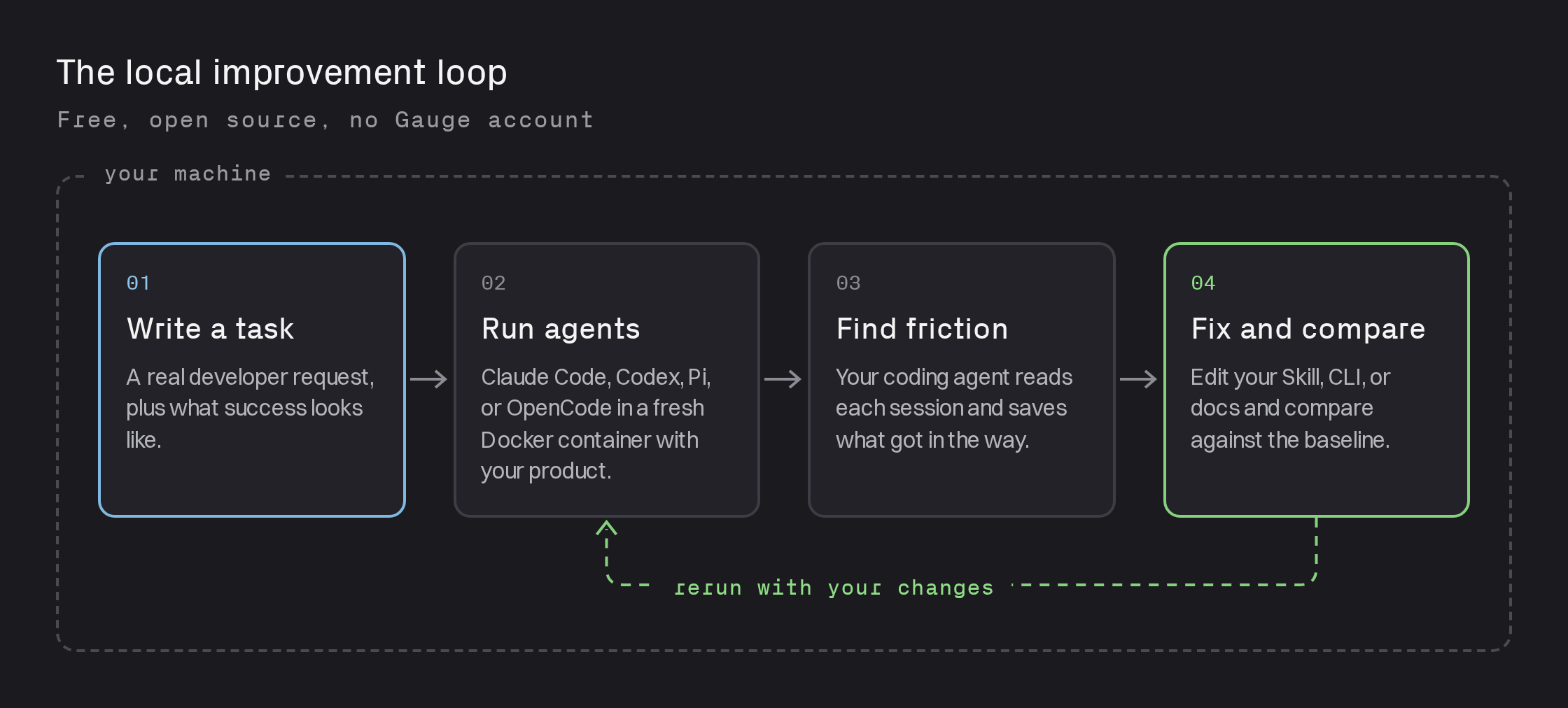
Gauge is built to be driven by your coding agent. Install the Gauge skill and ask your agent to find where agents struggle with your product. It writes representative tasks, launches the runs, reads the sessions, and proposes a fix.
During development, the Gauge CLI lets you install pre-release builds of your docs, CLI, or SDK. This lets you see how your changes will affect coding agents before you publish.
Run gauge watch to follow your sessions live in the browser.
What you can find
Local runs surface the same kinds of friction we see in hosted Gauge:
- Blocked commands. An interactive prompt or login flow stalls the agent.
- Outdated patterns. The agent reaches for deprecated commands or old API shapes.
- Unused Skills. A Skill that would help goes unread.
- False limitations. The agent confidently claims your product can't do something it can.
- Lost workflows. The agent can't work out how your commands fit together.
You can also measure Agent Preference: give an agent an open-ended task like gauge run "Which CLI should I deploy with?" and see which product it picks and why.
Get started
Install the CLI and the Gauge skill, then ask your coding agent to get started:
npm install -g @withgauge/cli
gauge local runtime pull
gauge init --local
gauge install-skill
When you're ready to run agents at scale, share results with your team, or test against authenticated connections like your MCP/API, the same CLI works with hosted Gauge.
Issues are welcome on GitHub. If you build something on top of the local backend, we'd love to hear about it.
This post is part of Gauge Launch Week.
Related Blogs
Skills and Schedules in Ask Gauge
Teach Ask Gauge your team's playbooks with Skills, then run them on a schedule. Gauge does recurring AEO work for you and reports back in Slack or email.
 Ethan Finkel
Optimize for Chat and Agents in One Platform
Gauge brings AEO and coding agent optimization together. Use Gauge Chat and Gauge Agents through one CLI and MCP.
Ethan Finkel
Gauge Launch Week
Five launches in five days, from November 2 to November 6. This post links to every launch as it goes live.
Ethan Finkel